How to Get a YouTube Transcript for Claude
Claude can't watch a YouTube video. Here's how to get the transcript in, handle the context window, and which prompts to run once it's there.
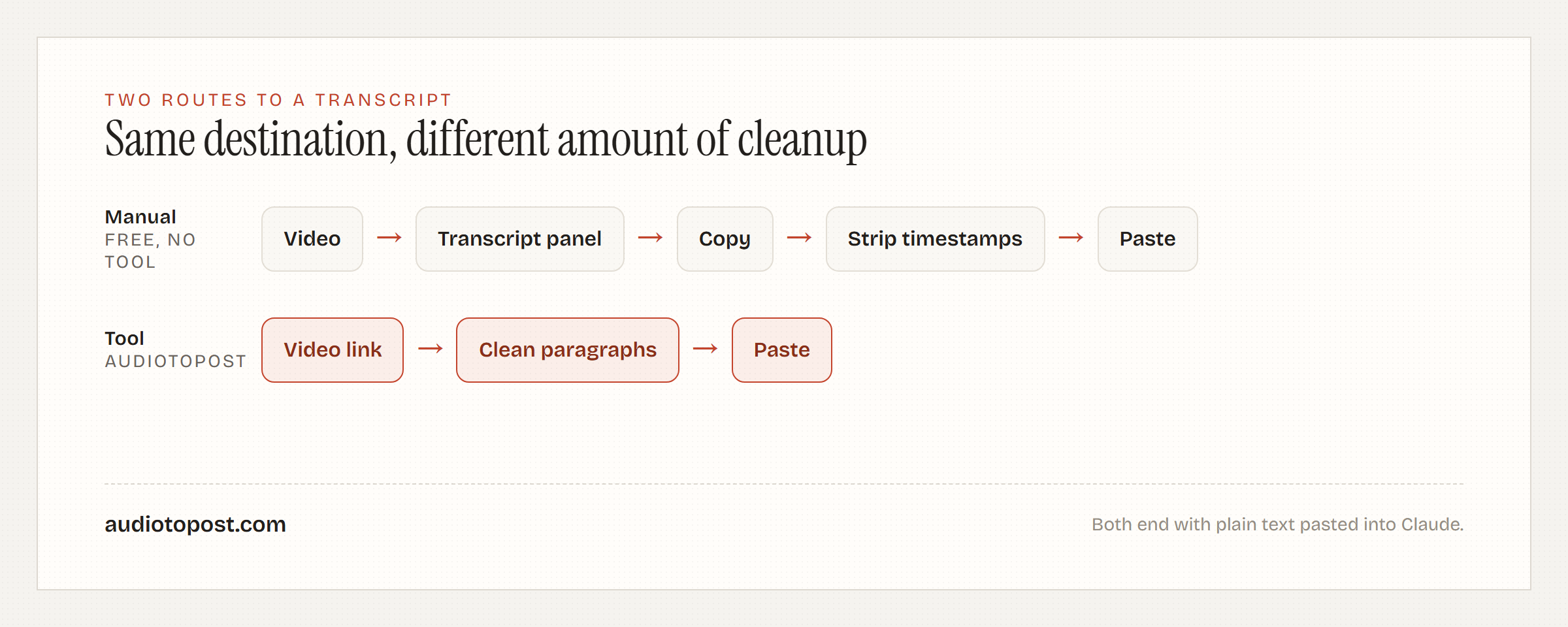
If you've searched how to get a YouTube transcript for Claude, you've probably already run into the problem: Claude doesn't watch YouTube videos. Paste a link into the chat and it reads the URL as a string of characters, not the footage behind it, so there's no shortcut around pulling the actual words out of the video and putting them in front of the model yourself. There are two ways to close that gap: copy it out of YouTube's own transcript panel by hand, or run the video through a tool that cleans the same captions into plain paragraphs for you. Either path ends with text sitting in the chat that Claude can read. This walks through that whole job: the free manual method, where it starts to hurt on a long video, what a long transcript does to the context window once it's in there, and a handful of prompts worth running once the text is actually sitting in Claude.
The Manual Way: YouTube's Own Transcript Panel
YouTube ships a transcript feature on most videos already, and for short clips it's genuinely enough on its own. Here's the whole path:
- Open the video.
- Click the three-dot menu below the player (on some layouts it's tucked under the description instead).
- Choose "Show transcript." A panel opens down the side with every caption line and its timestamp.
- Open the panel's own menu and toggle timestamps off, if you don't want the numbers in your paste.
- Select the whole transcript and copy it.
For a five-minute video, or when you only need one quote, this is the right amount of effort. No signup, no tool, done in under a minute.
Where the Manual Route Hurts
The transcript panel gives you one caption fragment per line, not full sentences, because that's how captions are timed to the video. So what you paste into Claude is a wall of choppy line breaks, a sentence split across three or four lines, with no paragraph structure at all. Claude can usually work with that, but you're spending tokens on line breaks and, if you left timestamps on, on numbers that add nothing to a summarization or note-taking prompt.
On a five-minute video this is a non-issue. On a ninety-minute interview or a long lecture, you're pasting several thousand words of fragments, and cleaning that up by hand before you even start working with it is real time.
The Context Window Problem (Most Guides Skip This)
This is the part that actually matters and the reason most "just paste the transcript" advice falls apart on long videos. Every model you talk to, Claude included, has a limit on how much text fits in one conversation at a time, and a transcript eats into that limit the same as anything else you type or paste.
A rough way to think about how many tokens a transcript costs: as a loose rule of thumb, text runs somewhere around 1.3 tokens per word, so a 10,000-word transcript is in the neighborhood of 13,000 tokens before you've asked Claude anything or gotten an answer back. People speak at somewhere around 130 to 150 words a minute in normal conversation, so a 90-minute interview can already be pushing 12,000 to 15,000 spoken words, and a three-hour podcast is two or three times that. None of this is exact, filler words and pauses change the math, but it's enough to see the shape of the problem: a short clip is nothing to worry about, a long-form conversation adds up fast, and it only gets worse once you're pasting more than one video's transcript into the same chat with Claude.
Claude's context window is large, large enough that most individual videos fit without any trouble at all. But "large" isn't "unlimited," and once a transcript is long enough to strain it, cramming the whole thing in at once tends to produce worse answers anyway, the model has more to track and less room to reason about it. Two things actually work when you hit that wall:
- Go section by section. Split the transcript at natural breaks (a chapter marker, a topic change, a guest changing) and ask Claude to work through one chunk at a time, then have it stitch the per-section notes together at the end.
- Strip it down first. If you don't need the full text, cut it down to the parts relevant to what you're actually after before it goes into Claude at all. A clean paragraph transcript is already smaller than a wall of timestamped fragments, which is one reason it's worth generating a clean version in the first place instead of pasting the raw caption panel.
Prompts Worth Running Once the Transcript Is in Claude
Once the transcript is in the chat, what you ask matters more than how you got the text there. A few that consistently produce something usable:
Summarize with the key moments called out
Summarize this transcript in three to five paragraphs, then list the 6-8 most important claims or turning points the speaker makes, in the order they happen. If timestamps are included in the text, note the closest one next to each item.
Extract every claim so you can fact-check it yourself
Go through this transcript and pull out every specific, checkable claim the speaker makes: numbers, dates, names, and cause-and-effect statements. List them one per line, nothing else added, no summarizing or softening. I want to verify these myself.
Turn it into study or reference notes
Turn this transcript into a set of notes. Use a heading for each time the topic shifts, bullet points under each heading, and bold any term someone would need to look up to follow the section.
Find the one part relevant to a specific question
I'm looking for anything in this transcript about [your topic]. Quote the relevant sentences directly, in the order they appear, and tell me roughly where in the video each one falls if timestamps are present.
That last one doubles as a way to do youtube transcript search inside a conversation instead of scrubbing through the video yourself, since you're asking Claude to locate and quote rather than paraphrase.
The Faster Way: Pull and Clean the Transcript in One Step
If you'd rather skip the copy-paste-cleanup cycle, AudioToPost's YouTube transcript generator does the pull-and-clean part in one step: paste the video link, and it reads the same caption track YouTube's own panel uses, strips the timestamps, drops repeated lines, and hands back plain paragraphs instead of fragments. Copy that straight into Claude and you're skipping the manual cleanup, not changing what you paste into it. There's a free plan with 5 credits a month and no card required, and the first generation doesn't even need an account, so trying it costs nothing but the time it takes to paste a link. For a short clip you already know by heart, the manual panel is still the faster call, free and tool-free. The gap opens up once the video runs long: that's where copying and untangling fragments by hand starts costing real time, and where a tool built to skip that step earns its keep.
| Manual (YouTube's panel) | AudioToPost's tool | |
|---|---|---|
| On a 90-minute video | Several minutes of copying and untangling fragments by hand | One paste, output comes back clean |
| What you get | Timestamped caption fragments, one per line | Plain paragraphs |
| Cleanup needed | Yes: strip timestamps, rejoin fragments into sentences | None |
| Cost | Free | Free to try (one generation, no account); a free account after that gets 5 credits a month |
| Account needed | No | Not for the first generation; a free account after that |
| Video has no captions | Nothing to select, no transcript | Returns an error instead of guessing |
It's honest to say what it can't do, too: it reads whatever caption track the video already has, manually written or auto-generated, and if a video has no captions at all, there's nothing to pull, and it returns an error instead of guessing. That's the same limitation the manual method has. It just gets you there in one step instead of five.
So that's how to get a YouTube transcript for Claude, start to finish: pull the words out of the video, clean them up so you aren't spending the conversation on timestamps, and decide up front how much of the transcript the question you're asking actually needs.
FAQ
Can I just paste a YouTube link into Claude and have it read the video?
No. As of now, Claude can't open a YouTube URL and watch or listen to what's in it. It treats the link as text, so you still need to get the transcript itself into the conversation, either by copying it from YouTube's panel or generating a clean version and pasting that in.
Will a really long video's transcript actually fit?
Usually, yes, most single videos fit fine. It's long-form content, a multi-hour podcast or a full conference day, where you start bumping into the limit, and pasting several long transcripts into one conversation makes it worse. When that happens, working through the transcript section by section gets you further than trying to force the whole thing in at once.
What if the video has no captions at all?
Then there's no transcript to get, by any method. YouTube's panel and any tool that reads captions, including AudioToPost's, both rely on a caption track existing. If a video has none and YouTube hasn't auto-generated any, waiting for auto-captions to appear or transcribing it yourself is the only path.
Does this work for getting a youtube transcript for ChatGPT too?
Yes, the workflow is the same: get the transcript text by whatever method, then paste it into the chat. ChatGPT has its own separate limit on how much text fits in a conversation, so the context-window advice above still applies, it just applies to a different tool.
How accurate is the transcript itself?
It's only as accurate as the caption track it comes from. Manually written captions are usually clean. Auto-generated ones carry YouTube's normal speech-recognition mistakes, missed words and the occasional wrong homophone, and neither the manual copy nor an automated pull corrects those errors, they just format what's already there.
Can I search a long video for one specific part instead of reading the whole transcript?
Yes, once the transcript is in Claude, ask it directly, "find anything about [your topic] and quote it," rather than reading start to finish. It's a faster way to do youtube transcript search than scrubbing the video's timeline by hand.